Introducing Selflane Displays: A KDS Built for the Pace of Your Kitchen
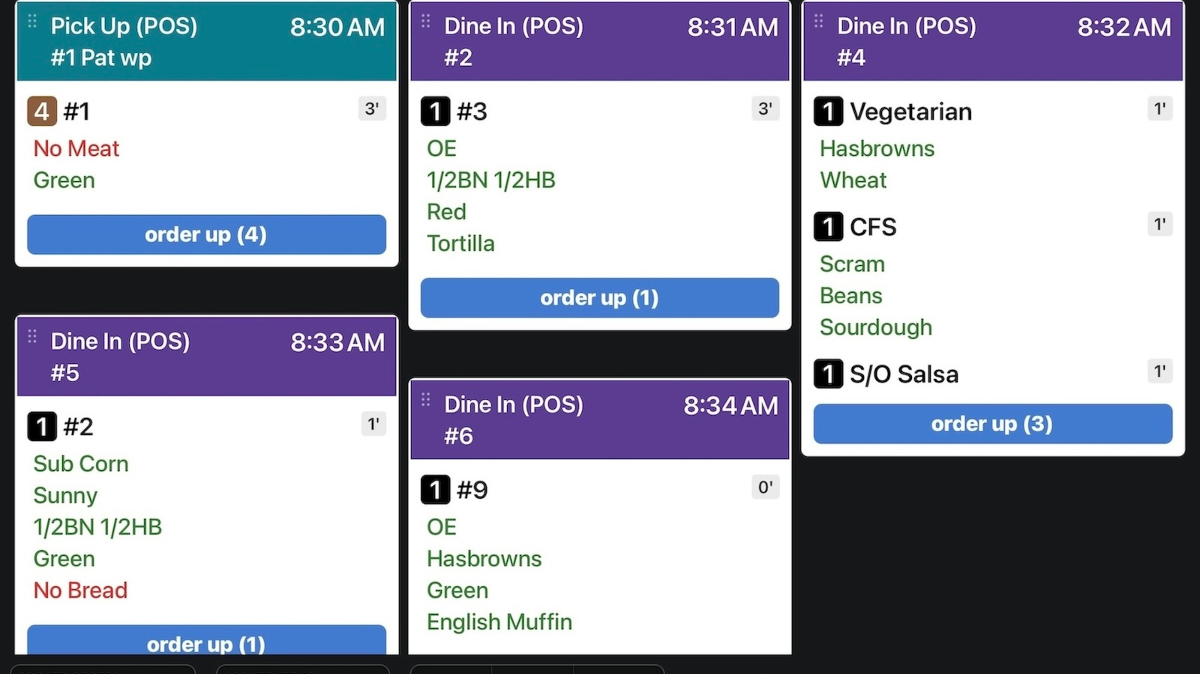
If your kitchen still runs on paper tickets, you know the cost: lost slips, smudged ink, and the constant shuffle to keep stations in sync. Selflane Displays replaces all of that with a single real-time grid that every line cook, expeditor, and manager can read at a glance.
What it does
Orders flow directly from your Selflane POS and online channels into a color-coded grid — purple for dine-in, teal for pickup, green for delivery, orange for drive-thru. Cooks tap a dish to mark it ready, or tap Order Up to clear the whole ticket. The grid refreshes automatically every 60 seconds and updates instantly when new orders arrive via push notification, even if the app is in the background.
Built for real kitchen flow
A few things we sweated:
- Smart timers. Each dish shows elapsed time since it was fired, with a green "Hold" countdown for hold-printed items and a red badge once a dish has been waiting more than 30 minutes.
- Late and future alerts. Orders more than 20 minutes past their needed time get a red "Running Late" banner. Orders needed more than 60 minutes out get a purple "Future" banner so they stay out of your active queue.
- Station and channel filters. Show only the stations a screen is responsible for, or filter by In-store, Selflane online, and 3rd Party orders (DoorDash, Uber Eats, and more).
- Layouts that fit your screen. Choose a masonry-style vertical grid (1–6 columns) for a big expo display, or a horizontal scrolling layout for a narrow secondary screen.
- No accidental taps. Sending a full "Order Up" requires a confirm tap, so a brushed sleeve doesn't fire your kitchen.
Getting started
Selflane Displays runs on any iOS or Android tablet — we recommend a 10" or larger screen, mounted and plugged in. It requires an active KDS subscription. Download from the App Store, or grab the Android build at selflane.com/apps.
Read the full docs
Setup, settings, filtering, and troubleshooting are all covered in the documentation: